Geometric Figures
Geometric elements include Lines, Functions, Points, Circles, and Curves.
Point
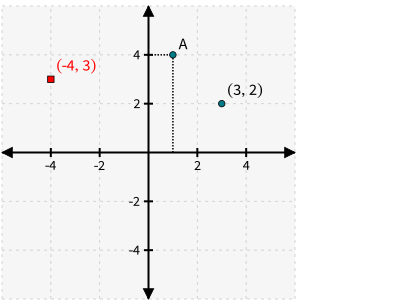
Place a single marker point in the coordinate plane.
with zp.GraphQuad().xrange(-5, 5).yrange(-5, 5).equal_aspect():
    zp.Point((3, 2)).label('(3, 2)')
    zp.Point((1, 4)).guidex().guidey().label('A')
    zp.Point((-4, 3)).label('(-4, 3)').color('red').marker('square')
Tip
Use .guidex() and .guidey() to draw guiding lines to the x and y axis.
Tip
Use .label() to add text annotation to a Point. The second parameter to .label() specifies the compass-direction to draw the label around the point, i.e. ‘N’, ‘S’, ‘E’, ‘W’, ‘NE’, ‘NW’, etc.
Line
A straight line, filling the entire diagram.
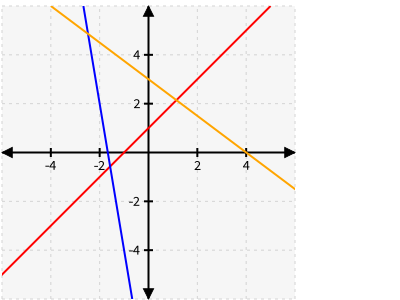
Lines may be created from:
A point on the line and the slope of the line
Two points on the line (classmethod from_points)
The slope and y-intercept of the line (classmethod from_slopeintercept)
with zp.GraphQuad().xrange(-5, 5).yrange(-5, 5).equal_aspect():
    zp.Line((1, 2), 1).color('red')
    zp.Line.from_points((-2, 2), (-1, -4)).color('blue')
    zp.Line.from_slopeintercept(-.75, 3).color('orange')
Note
Unlike some other elements, Lines do not change the data limits displayed by the graph.
HLine
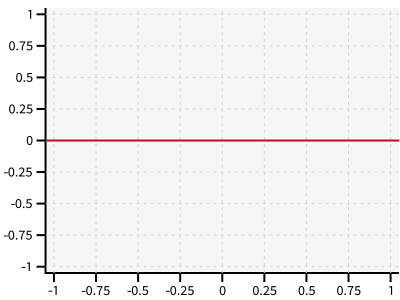
A horizontal line.
zp.HLine(0)
VLine
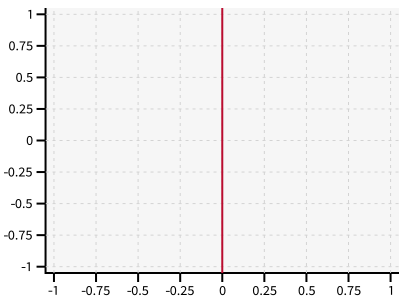
A vertical line.
zp.VLine(0)
Segment
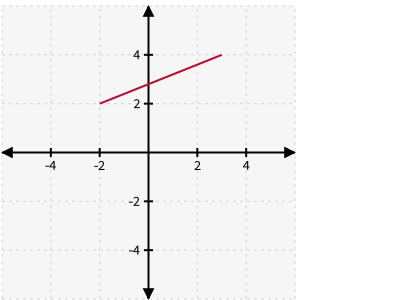
A line segment, defined by its two endpoints.
with zp.GraphQuad().xrange(-5, 5).yrange(-5, 5).equal_aspect():
    zp.Segment((-2, 2), (3, 4))
Tip
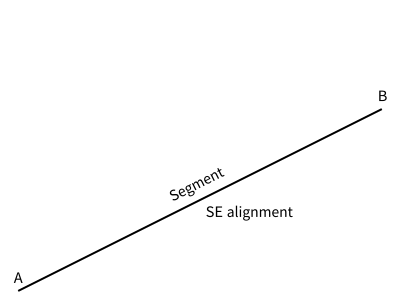
Place text along a segment using .label. The loc parameter specifies the relative position, from 0-1, along the segment. align provides the compass-direction to align the text relative to the point on the segment.
with zp.Diagram().css(zp.CSS_BLACKWHITE):
    seg = zp.Segment((-1, 0), (1, 1))
    seg.label('A')
    seg.label('B', loc=1)
    seg.label('Segment', loc=.5, rotate=True)
    seg.label('SE alignment', loc=.5, rotate=False, align='SE')
Tip
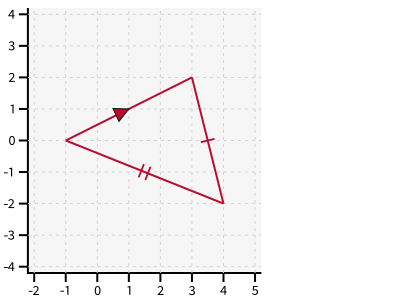
Use .midmarker() to add a single marker to the midpoint of a Segment.
with zp.Graph().equal_aspect().xrange(-2, 5).yrange(-4, 4):
    zp.Segment((-1,0), (3, 2)).midmarker('>')
    zp.Segment((3,2), (4, -2)).midmarker('|').color('C0')
    zp.Segment((4,-2), (-1, 0)).midmarker('||').color('C0')
Tip
Use .endmarkers() to add markers on each end of a Segment (or Function).
Vector
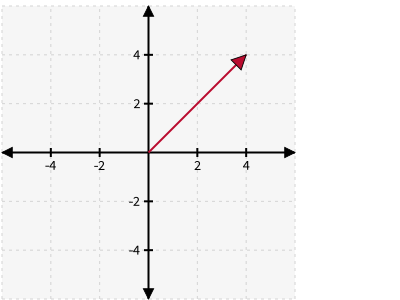
A line segment starting at the origin and ending with an arrow marker.
with zp.GraphQuad().xrange(-5, 5).yrange(-5, 5).equal_aspect():
    zp.Vector(4, 4)
Bezier
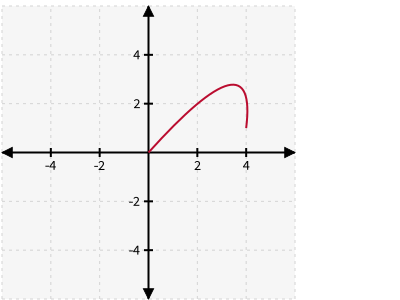
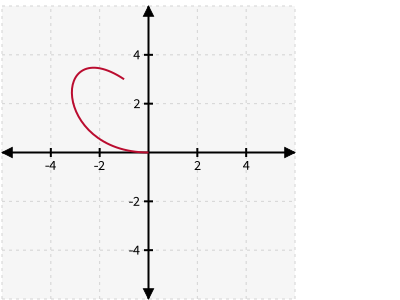
Quadratic and Cubic Bézier curves defined by 3 or 4 control points.
a1 = (0, 0)
a2 = (4.5, 5)
a3 = (4, 1)
with zp.GraphQuad().xrange(-5, 5).yrange(-5, 5).equal_aspect():
    zp.Bezier(a1, a2, a3)
b1 = (0, 0)
b2 = (-4, 0)
b3 = (-4, 5)
b4 = (-1, 3)
with zp.GraphQuad().xrange(-5, 5).yrange(-5, 5).equal_aspect():
    zp.Bezier(b1, b2, b3, b4)
See also
Curve
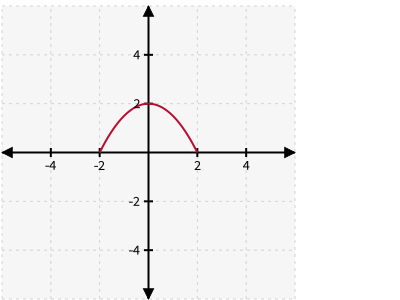
A symmetric quadratic Bézier curve defined by its endpoints and a deflection constant.
with zp.GraphQuad().xrange(-5, 5).yrange(-5, 5).equal_aspect():
    zp.Curve((-2, 0), (2, 0), k=1)
CurveThreePoint
A quadratic Bézier curve passing through three defined points.
a1 = (-1, 1)
a2 = (3, 4)
a3 = (4, 1)
with zp.GraphQuad().xrange(-5, 5).yrange(-5, 5).equal_aspect():
    zp.CurveThreePoint(a1, a3, a2)
    zp.Point(a1)
    zp.Point(a2)
    zp.Point(a3)
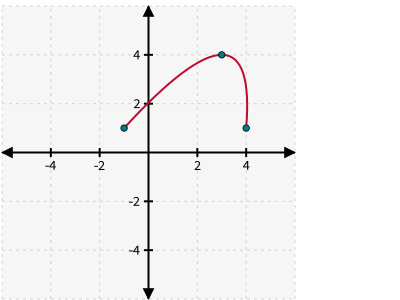
ziaplot.figures.bezier.CurveThreePoint
Function
Plot y = f(x), where f is a Python callable function of one variable (x) returning one variable (y).
with zp.GraphQuad().xrange(-2*math.pi, 2*math.pi):
    zp.Function(math.sin, (-2*math.pi, 2*math.pi))
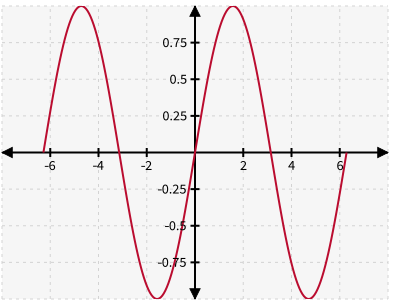
ziaplot.figures.function.Function
Tip
Use lambda functions to help define the callable, such as:
zp.Function(lambda x: x**2)
Implicit
Plot an implicit function f(x, y) = 0, where f is a Python callable of two variables (x and y) returning a value. Points where the value is found to be zero are plotted.
Note
xlim and ylim must be provided to define the domain over which to plot.
with zp.GraphQuad().equal_aspect():
    zp.Implicit(
        lambda x, y: x**2 + y**2 - 1,
        xlim=(-1.5, 1.5),
        ylim=(-1.5, 1.5))
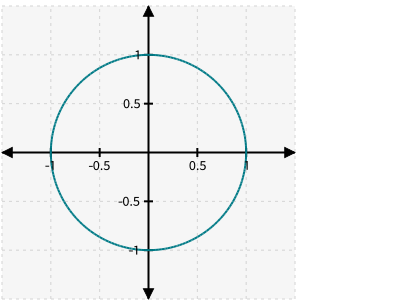
Circle
Draw a circle.
with zp.GraphQuad().xrange(-5, 5).yrange(-5, 5).equal_aspect():
    zp.Circle((0, 0), radius=2)
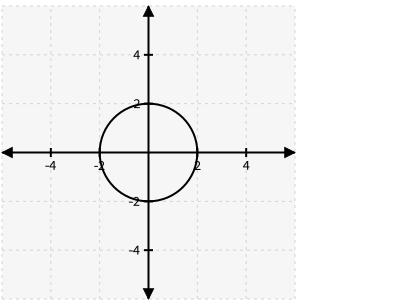
Tip
Use .equal_aspect() on the graph to ensure the circle is not stretched into an ellipse.
Circles may also be created from three points using
ziaplot.figures.shapes.Circle.from_ppp()
or tangent to three lines using
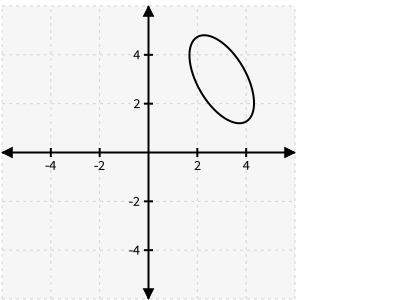
Ellipse
Draw an ellipse.
with zp.GraphQuad().xrange(-5, 5).yrange(-5, 5).equal_aspect():
    zp.Ellipse((3, 3), r1=1, r2=2, theta=30)
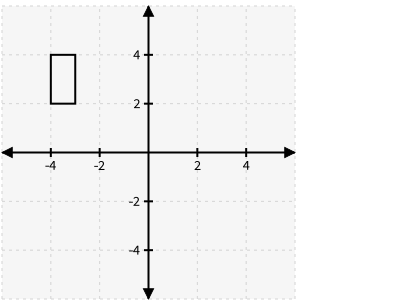
Rectangle
Draw a rectangle at (x, y) with a width and height.
with zp.GraphQuad().xrange(-5, 5).yrange(-5, 5).equal_aspect():
    zp.Rectangle(-4, 2, width=1, height=2)
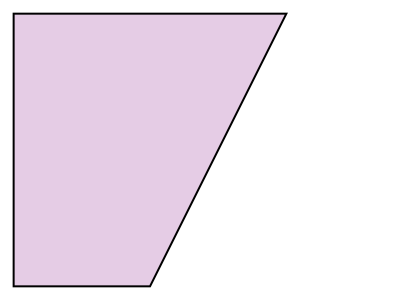
Polygon
Draw a closed polygon from the given vertices.
with zp.Diagram() as d:
    p1 = ((0,0), (.5, 0), (1, 1), (0, 1))
    zp.Polygon(p1).fill('purple 20%')
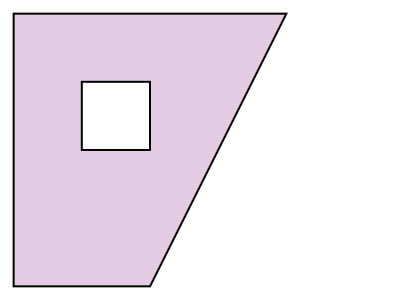
Multiple lists of vertices can be used, where the extra lists are cut as “holes” in the Polygon.
with zp.Diagram() as d:
    p1 = ((0,0), (.5, 0), (1, 1), (0, 1))
    p2 = ((.25,.5), (.5, .5), (.5, .75), (.25, .75))
    zp.Polygon(p1, p2).fill('purple 20%')
Tangents and Normals
Circles, Functions, and Curves have methods for creating tangent and normal lines.
to Circles and Ellipses
Use ziaplot.figures.shapes.Circle.tangent() to draw a tangent to the circle passing through a specific point (on or outside the circle).
There may be two possible tangents, so use the which parameter as top, bottom, left, or right to
specify the tangent point with the top-most or bottom-most y-value, or the left-most or right-most x-value.
with zp.Graph().equal_aspect().xrange(-4, 4).yrange(-4, 4):
    circ = zp.Circle((0, 0), 1)
    p = zp.Point((2, 1))
    t1 = circ.tangent(p, which='top').color('red')
    t2 = circ.tangent(p, which='bottom').color('blue')
    zp.Point(t1.point)
    zp.Point(t2.point)
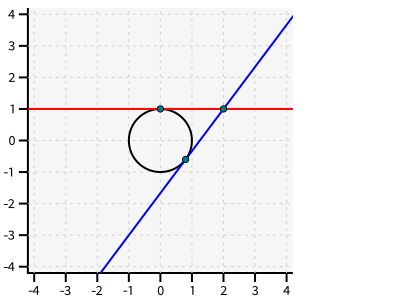
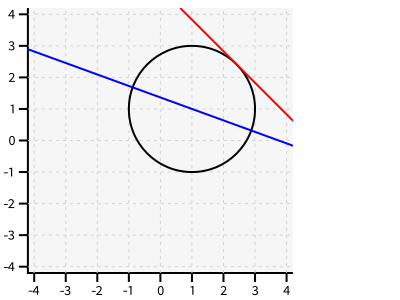
Use ziaplot.figures.shapes.Circle.tangent_at() to draw the tangent at a specific angle theta around the circle (or ellipse).
with zp.Graph().equal_aspect().xrange(-4, 4).yrange(-4, 4):
    circ = zp.Circle((1, 1), 2)
    circ.tangent_at(theta=45).color('red')
    circ.normal_at(angle=160).color('blue')
Note
Tangent lines may be turned into segments using .trim or .trimd methods. The d1 and d2 parameters to trimd specify how far to extend the segment in each direction.
to Functions
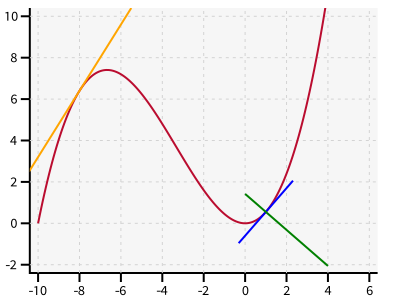
On Functions, the ziaplot.figures.function.Function.tangent() method requires the x value at which to draw the tangent or normal.
with zp.Graph().equal_aspect().xrange(-10, 5).yrange(-2, 10):
    ff = zp.Function(lambda x: x**3/20 + x**2 /2, xrange=(-10, 5))
    ff.tangent(x=-8).color('orange')
    ff.tangent(x=1).trimd(1, 2, 2).color('blue')
    ff.normal(x=1).trim(0, 4).color('green')
to Bézier Curves
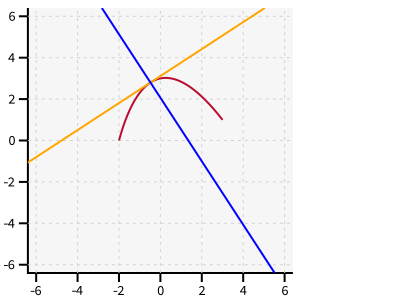
The tangent and normal functions require the parameter t (from 0-1) along the curve.
with zp.Graph().equal_aspect().xrange(-5, 5).yrange(-5, 5):
    b = zp.Curve((-2, 0), (3, 1), k=1)
    b.tangent(t=.4).color('orange')
    b.normal(t=.4).color('blue')
Placing Points
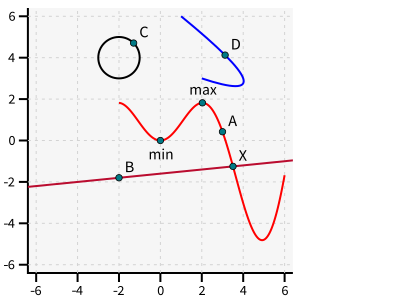
ziaplot.figures.point.Point.at(): Place a point on a Line or Function f at the x value.ziaplot.figures.point.Point.at_y()Place a point on a Line or Function f at the y value.ziaplot.figures.point.Point.on_circle(): Place a point on Circle or Ellipse c at an angle theta.ziaplot.figures.point.Point.on_bezier(): Place a point on the Bézier curve at parameter t.ziaplot.figures.point.Point.at_intersection(): Place a point at the intersection of two Functions, Lines, or Circlesziaplot.figures.point.Point.at_minimum(): Place a point at the local minimum of f between x1 and x2ziaplot.figures.point.Point.at_maximum(): Place a point at the local maximum of f between x1 and x2ziaplot.figures.point.Point.at_midpoint(): Place a point halfway between two pointsziaplot.figures.point.Point.image(): Image the point onto a lineziaplot.figures.point.Point.reflect(): Reflect the point over a line
with zp.Graph().equal_aspect().xrange(-5, 5).yrange(-5, 5):
    func = zp.Function(lambda x: x*math.sin(x), (-2, 6)).color('red')
    curve = zp.CurveThreePoint((1, 6), (2, 3), (4, 3)).color('blue')
    circle = zp.Circle((-2, 4), 1)
    line = zp.Line((-4, -2), .1)
    zp.Point.at(func, x=3).label('A')
    zp.Point.at(line, x=-2).label('B')
    zp.Point.on_circle(circle, theta=45).label('C')
    zp.Point.on_bezier(curve, t=.25).label('D')
    zp.Point.at_intersection(line, func, bounds=(2, 6)).label('X')
    zp.Point.at_minimum(func, -2, 2).label('min', 'S')
    zp.Point.at_maximum(func, 0, 3).label('max', 'N')
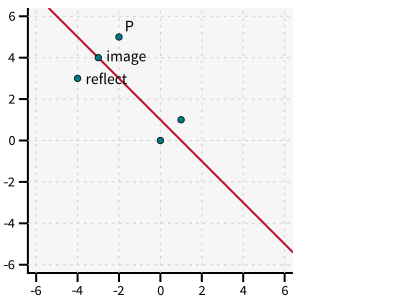
The line bisecting two points may be drawn with the point’s ziaplot.figures.point.Point.bisect() method.
with zp.Graph().equal_aspect().xrange(-5, 5).yrange(-5, 5):
    A = zp.Point((0, 0))
    B = zp.Point((1, 1))
    line = A.bisect(B)

    C = zp.Point((-2, 5)).label('P')
    D = C.reflect(line).label('reflect', 'E')
    E = C.image(line).label('image', 'E')
Angles
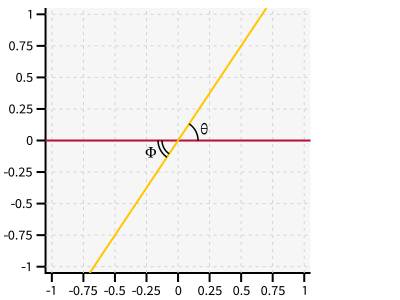
Draw the arc of an angle between two lines.
with zp.Graph().equal_aspect():
    line1 = zp.Line((0,0), 0)
    line2 = zp.Line((0,0), 1.5)
    zp.Angle(line1, line2, quad=4).label('θ')
    zp.Angle(line1, line2, quad=2, arcs=2).label('Φ')
ziaplot.annotations.annotations.Angle
Note
Use quad to specify which of the four quadrants (1-4) to put the arc in.
Use arcs to specify the number of arcs to draw
An angle bisector may be drawn between two intersecting lines. As there are two bisectors, use the which parameter to specify the bisector with a positive (or 0) slope +, or the bisector with a negavie (or infinite) slope -.
with zp.Graph().equal_aspect():
    line1 = zp.Line((0,0), 0).color('black')
    line2 = zp.Line((0,0), 1.5).color('black')
    line1.bisect_angle(line2, which='+').stroke('dashed').color('purple')
    line1.bisect_angle(line2, which='-').stroke('dashed').color('green')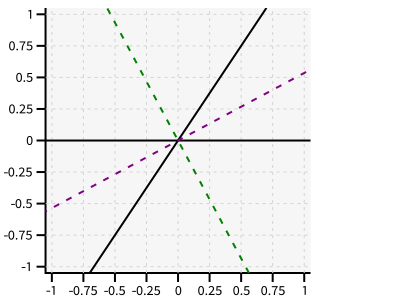
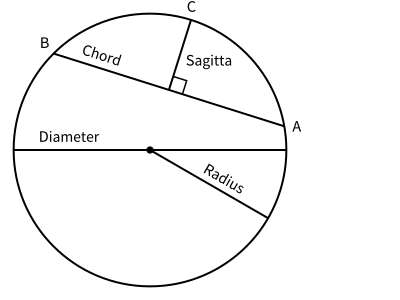
Lines on a Circle
Draw Segments associated with a circle with these circle methods:
ziaplot.figures.shapes.Circle.diameter_segment(),
ziaplot.figures.shapes.Circle.radius_segment(),
ziaplot.figures.shapes.Circle.chord(),
ziaplot.figures.shapes.Circle.secant(),
ziaplot.figures.shapes.Circle.sagitta(),
with zp.Diagram().css(zp.CSS_BLACKWHITE).equal_aspect() as g:
    zp.Point((0, 0))
    circ = zp.Circle((0, 0), 2)
    ch = circ.chord(10, 135).label('A', 0, 'E').label('B', 1, 'NW').label('Chord', .8, rotate=True)
    sg = circ.sagitta(10, 135).label('C', 0, 'N').label('Sagitta', .6, 'E')
    zp.Angle(ch, sg, quad=4)
    circ.diameter_segment(0).label('Diameter', .8)
    circ.radius_segment(-30).label('Radius', .6, rotate=True)
IntegralFill
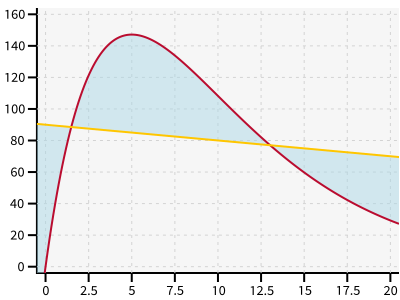
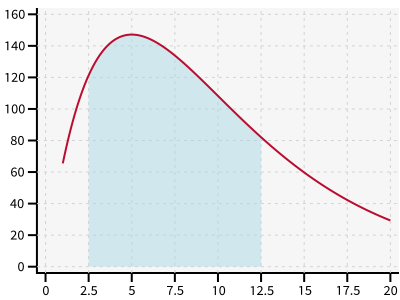
Fill the area under a Function between two x values. Or fill the area between two Functions.
with zp.Graph().xrange(0, 20).yrange(0, 160):
    ff = zp.Function(lambda x: 80*x*math.exp(-.2*x), xrange=(1,20))
    zp.IntegralFill(ff, x1=2.5, x2=12.5).color('lightblue 50%')
with zp.Graph().xrange(0, 20).yrange(0, 160):
    ff = zp.Function(lambda x: 80*x*math.exp(-.2*x))
    f2 = zp.Line.from_slopeintercept(-1, 90)
    zp.IntegralFill(ff, f2).color('lightblue 50%')